2022 - 2025
From Signature to Kickoff:
Designing the core flow that scaled Cone
Role
Founding Designer
Duration
2 years, 8 months
Company
Cone (YC S22)
Active users
3000+ UK Accounting Firms
Product
3 SaaS web-apps + 1 mobile app
Team
2 Designers, 5 Engineers, 3 Co-founders
The Backstory:
From a broken bet to a bold pivot
When I joined Cone as a Product Designer, we weren’t building for accounting firms.
The original idea was a Virtual CFO platform for startups, with human accountants + a SaaS dashboard to help founders track their finances.
We were serving an entirely different audience, using an entirely different product model.
But by month four, it became clear that the business wasn’t working.
High churn, poor engagement, and weak retention forced us to confront a hard truth:
We weren’t solving a painkiller problem. Startups didn’t want what we were building.
We needed a pivot. Fast.
I stepped up to co-lead early pivot research. I interviewed dozens of founders, accountants, and finance professionals.
Through that process, we discovered a much bigger, more stable, and deeply underserved opportunity hiding in plain sight:
Modern accounting firms (especially in the UK) were running high-volume businesses on brittle tool stacks, Frankensteined together with generic SaaS tools never designed for them.
Nothing connected. Nothing respected the firm as a collaborative unit.
One UK firm owner put it bluntly:
“It’s madness! 10 bloody tools, none of them talk to each other. We spend more time managing software than doing actual work.”
That was the real problem.

At Cone, we saw a better future:
A single, cohesive system where proposals, payments, projects, client portals, and internal ops live under one roof, designed for accountants, not adapted for them.
Not just integrated. Unified.

Not everyone was sold. Some pushed to double down on the startup product. But the interviews were clear.
So we made the call: shut down the original product and start fresh.
I was formally given the role of Founding Designer, since we were now building from zero.
No backlog. No design debt. No legacy UI. Just a clear opportunity to design the future of accounting from first principles.
Over the next 2.5 years, I helped design and scale Cone from a zero-revenue experiment to a 4-product SaaS platform used by 3000+ firms.
My Role:
Architecting the core product experience
With no PMs, Cone had two designers working in parallel, each owning an entire vertical.
I led the end-to-end product experience across Cone’s core products: Propose, Practice, and the client portals (web + mobile).
My co-designer specialized in billing and payments, owned the financial logic and invoicing systems end-to-end.
My scope included:
Interaction design & workflow architecture across proposals, projects, automations, inbox, roles & permissions, and more
Design systems, responsive frameworks, and cross-surface consistency
Personal execution of 25+ high-impact features,
from scoping to QA
QA lead for mission-critical surfaces (e.g. onboarding, proposal automations)
De facto PM responsibilities, collaborating daily with founders, engineers, and users
My work went beyond UI.
My role was to ensure every flow respected the way accounting firms actually work. Layering in clarity, control, and trust at every step.
Across 2.5 years, I designed and shipped 25+ major features.
This case study focuses on a handful of high-leverage flows. The ones that shaped Cone’s product identity, drove revenue, and cemented market fit.

The Wedge: Proposals as a Trojan Horse
Early in our pivot, we mapped the chaos:
Most accounting firms were running their business on 10+ disconnected tools, which fell into two broad buckets:
Client-facing tools for proposals, signatures, and onboarding
Internal tools for tasks, operations, and client communication
We assumed we'd need to pick a side.
But after 60–100 interviews with UK accounting firms (typically 100–200 active clients), we uncovered a third, unspoken category:
Payments: specifically, the broken experience of chasing them.
Despite modern tooling, this one step remained painfully manual:
Clients signed proposals but didn’t pay
Accountants had to follow up. Sometimes for days or weeks
Cash flow stalled, and trust eroded before work even began
This problem came up again and again:
“Clients ghost us after signing. Sometimes we don’t get paid at all.”
“If I don’t get payment details upfront, I end up chasing them for days. It kills the deal.”
“We start working, and we’re still hunting them down to pay.”
The root problem?
Most proposal tools treat signature as the finish line.
But for accounting firms, that’s where the real work begins.
After a client signed, the average firm still had to:
Manually generate an invoice
Create a payment link
Email it separately
Wait… and chase
This workflow broke trust, killed cash flow, and dragged teams back into coordination chaos.
We realized the real wedge wasn’t just "make proposals easier."
It was: turn proposals into a commitment engine.
Our wedge: Proposals that collect payment details at the point of signature.
Not a new screen. Not another tool.
A seamless flow: sign and pay, in one motion.
This small but strategic shift let us:
Eliminate the post-signature chase
Accelerate time to cash
Collapse proposal, e-sign, invoicing, and payment into a single flow
Trigger project kickoff instantly after payment
We reframed success from “proposal sent” → “payment secured.”
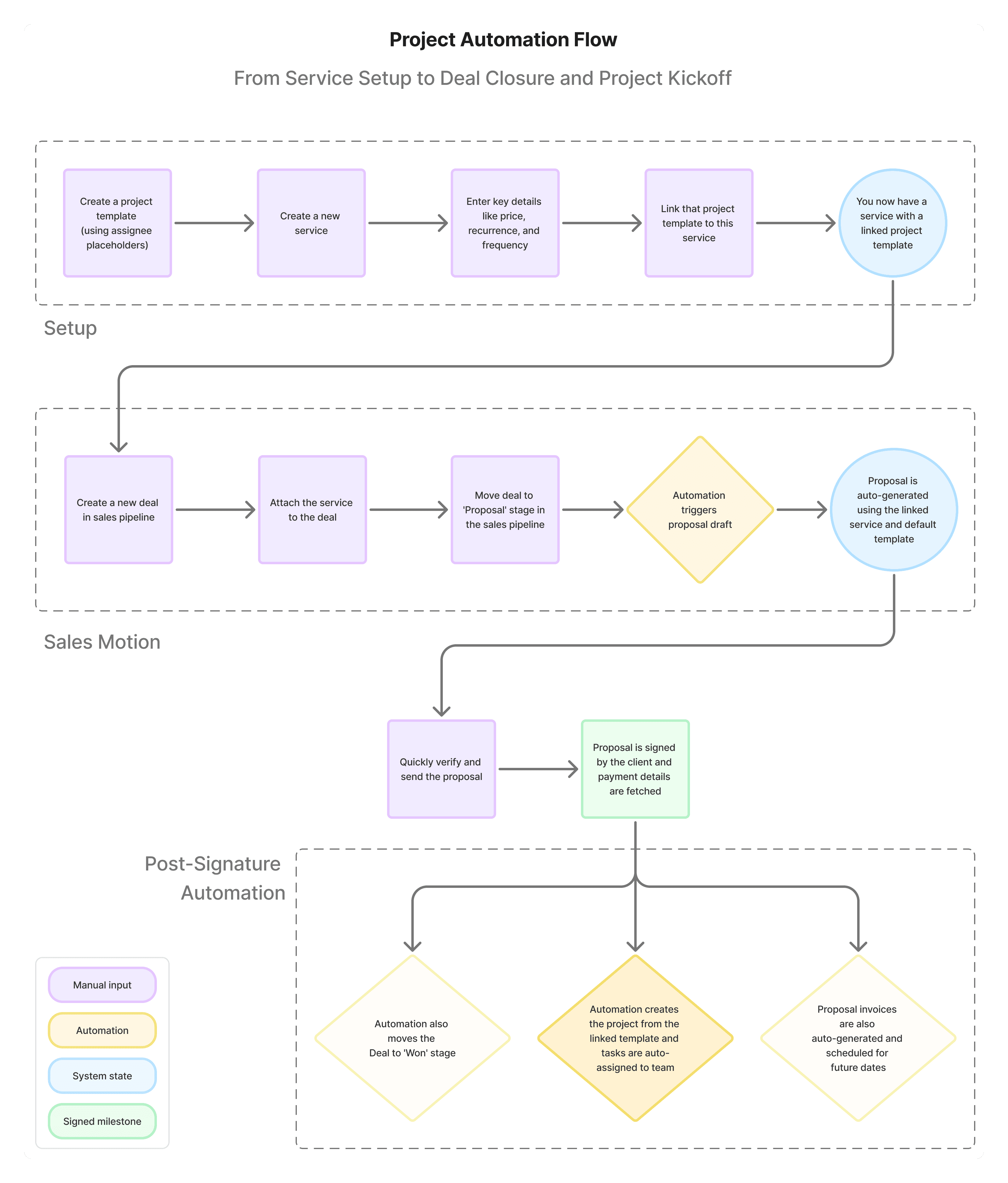
Proposal created from template
Signed by the client
Payment details captured immediately
Project auto-created from linked template
Work begins. Instantly
We collapsed 5 tools (Bonsai, DocuSign, Stripe, HubSpot, Asana) into one cohesive flow.
This was more than a feature. It was a strategic foothold into a firm’s entire workflow.
It solved a core revenue blocker. If firms can’t get paid, they can’t grow, and won’t need “practice management.”
It created urgency. While practice tools were “nice to have,” this was a painkiller.
It gave us leverage. Owning the proposal-to-payment flow made Cone the source of truth for client work and unlocked downstream products.
Signature to Kickoff: 5 Strategic UX decisions
Most firms were used to freeform tools like Google Docs or Canva. But that flexibility came at a cost: formatting errors, inconsistent branding, and forgotten legal terms.
To support payment at signature, we needed structure and system logic.
“You’d fix a typo in the intro, and the services block would jump to the next page”
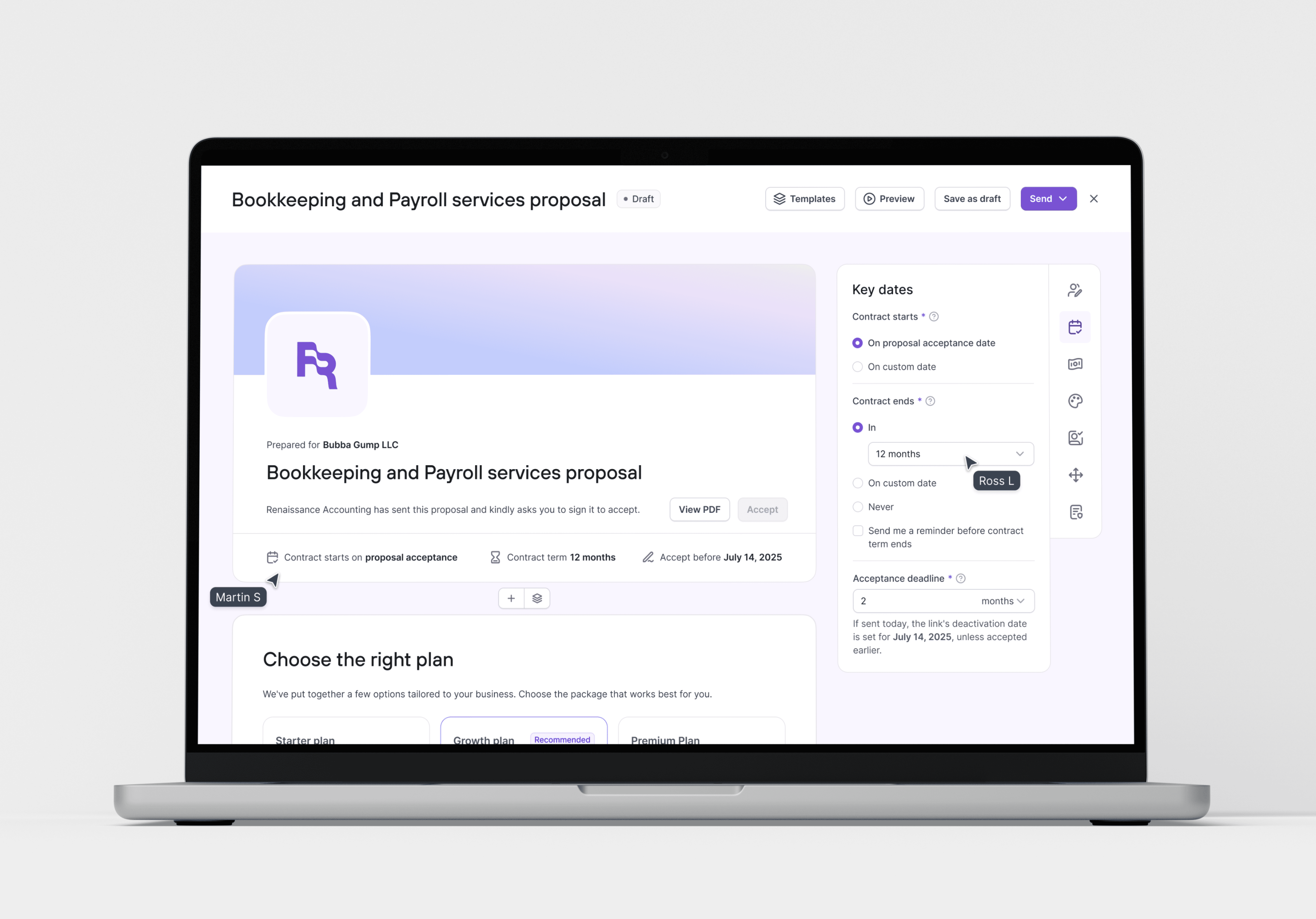
I led the design of a modular, vertically stacked proposal builder, grounded in proven conversion flows:
Fixed sections: firm intro, services & pricing, engagement terms, signature block, payment collection
Opinionated defaults, validated through 1:1 feedback with high-converting firms
Lightweight A/B testing via side-by-side Figma mockups to assess usability and trust perception
Some power users initially resisted the structure.
We addressed this by introducing reorderable sections (except signature/payment), and the ability to save proposal templates.
Without structure, we couldn’t reliably trigger downstream workflows like payment capture or project creation.
🎯 Impact:
Time to first proposal: ↓ to <30 mins
Repeat proposals: ↓ to <1 min via saved templates
Support tickets: ↓ 80%, due to reduced formatting and PDF issues


Once proposal-to-payment was seamless, we tackled the next friction point: post-sale delivery.
The team initially scoped Cone Practice as a basic task board. I pushed for an automation-first project workspace based on repeated user insights:
“The moment a proposal is signed, I want the work to begin automatically.”
We reimagined projects as structured workflows, not lists of tasks. With:
Auto-creation of projects from signed proposals
Service-linked task templates
Recurring project logic for monthly/quarterly services
Event-driven automation, e.g., “When bookkeeping review is marked done, auto-start payroll prep for that month.”
Founders originally saw automation as “nice-to-have add-on.” I argued it was foundational for trust, speed, and scale.
🎯 Impact:
Setup time: ↓ 30%+ manual effort for mid-sized firms
Time to onboarding: ↓ to <24 hours post-signature
Retention lever: Experienced users began relying on granular automations as a core workflow

Emails were the blind spot in most firms: buried threads, forgotten tasks, missed deadlines.
The initial scope called for a Gmail-style reader. I pushed for a triage-first inbox built around action, not archiving:
“We don’t read emails. We act on them.”
We designed a system that transformed email threads into trackable tasks:
Assignable owners
Status tracking and deadlines
Auto-tagging via contact matching
“We defaulted the inbox view to show only emails from verified client contacts, so teams could focus on what mattered, fast.”
This made the inbox an operational tool, not a passive archive.
🎯 Impact:
Inbox → task delegation usage: ↑ from 12% → 41% in 3 weeks
Reduced context switching to external PM tools
Increased team-wide visibility and accountability across client ops


Firms consistently requested a mobile app for client portals. We built it.
But after 6 months in the production, usage data told a different story: <5% of their clients used mobile.
Nearly all completed actions via web.
We dug deeper:
Firms requested mobile to signal professionalism
Their clients preferred desktop UX for document upload, e-signatures, and form-filling requests
Despite repeated requests, we made a hard call: sunset mobile, reinvest in web UX, and validate all roadmap bets through usage. Not volume of requests.
🎯 Impact:
Reclaimed engineering velocity
Avoided compounding roadmap debt
Sent a cultural signal: we follow data, not noise
Web adoption increased after doubling down on key flows

In accounting firms, access isn’t just about convenience, it’s about trust and liability.
Accounting firms handle highly sensitive data: tax returns, payroll, legal docs. But most SaaS tools assumed every team member should see everything.
This was dangerous, especially for firms that:
Operated with clear internal hierarchies
Brought in short-term contractors during tax season
Needed to separate access by client, function, and seniority
“I can’t have a freelancer seeing all our client chats. That’s a legal and reputational risk.”
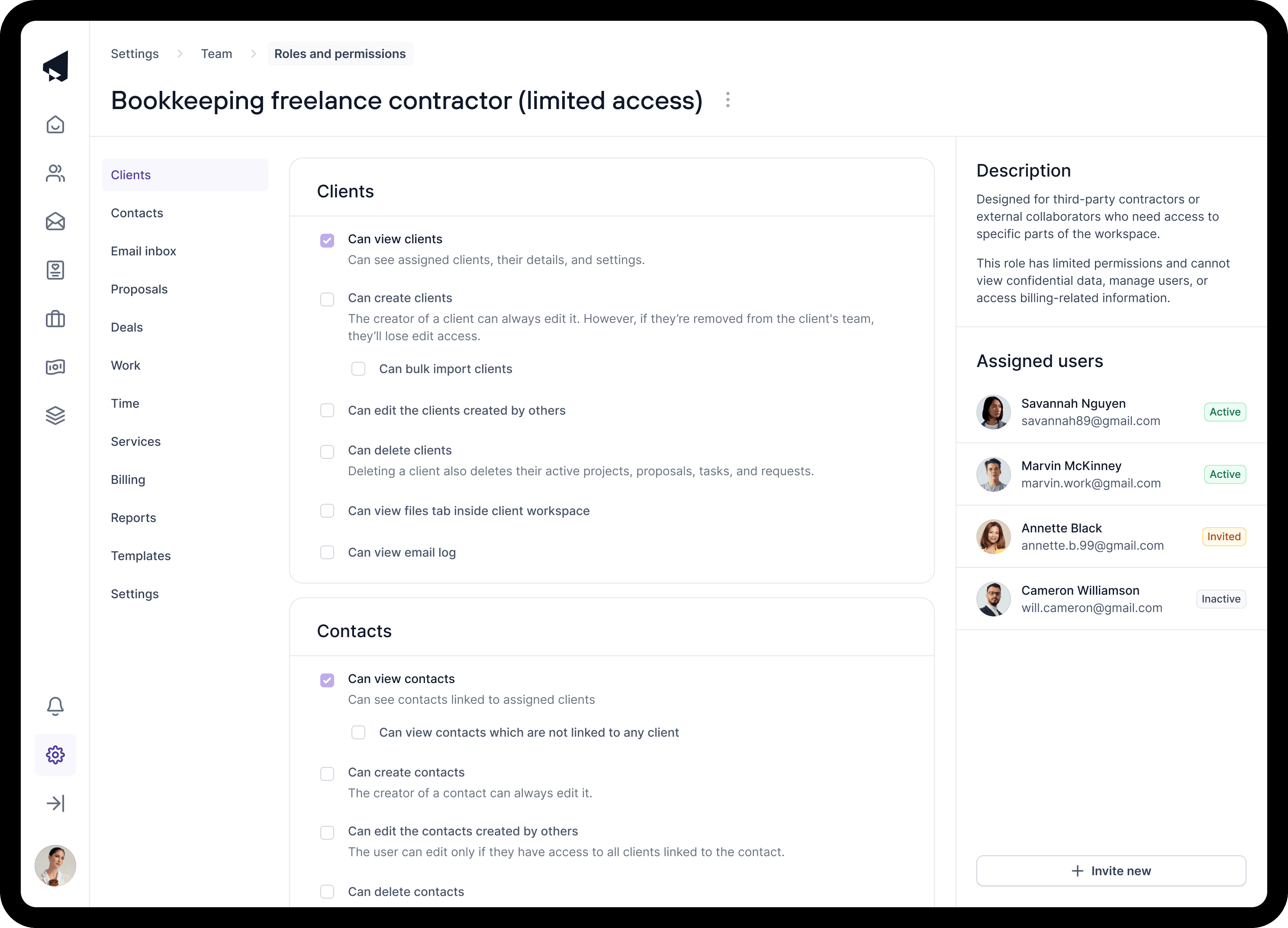
I led the design of a robust, flexible permissioning system built into Firm Settings, with:
Custom role creation, not just pre-baked templates
Granular permissions per UI surface (e.g., proposal view vs edit, client request visibility, inbox assignment rights)
Audit visibility: admins could preview role capabilities before assigning
Inheritance patterns for team leads and junior staff
During QA, I ran dozens of end-to-end role simulations across the app, ensuring every permission toggle behaved correctly across web and portal surfaces.
Behind the scenes, this required deep QA across the entire app. Each new permission toggle meant a new state to test. I worked closely with engineers to validate:
Auth states on every screen
UI element visibility under restricted roles
Edge cases like changing roles mid-project or post-invite
🎯 Impact:
Reduced data leakage risk for 3000+ active firms
Decreased setup time via plug-and-play role templates
Reduced accidental data exposure incidents (qualitative feedback)
Enabled safe onboarding of seasonal freelance contractors without support overhead
Results:
Moving the right needles
Before Cone, most firms took days to close clients, even after a signed proposal. Payment delays, setup friction, and tool sprawl killed momentum.
After Cone, firms could go from proposal sent → paid → project started in under 24 hours.
We turned a patchwork of disconnected tools into one cohesive motion, and the results showed up everywhere:
Time to first proposal:
⬇️ from hours → <30 minsRepeat proposal send:
⬇️ to <60 seconds via saved templatesUX-related support tickets:
⬇️ to <10% post-onboardingDeal closure speed:
⬆️ 3× faster (firm-reported)Manual effort:
⬇️ 30%+ via automation-first workflowsTool stack consolidation:
⬇️ from 10–12 tools → 2–3
“We’ve never closed clients this fast before! Cone’s flow just works.”
— Partner, mid-sized UK accounting firm
“I don’t need to touch Stripe, Asana, or DocuSign anymore. It’s all inside Cone.”
— Founder, 10-person remote-first firm
We tracked these results using Mixpanel funnels, custom backend events, and behavioral activation tags across key milestones:
Proposal created → Proposal sent → Payment secured → Automation triggered → Project launched.
Design Leadership: Raising the bar with leverage
In a PM-less, speed-biased environment, design leadership at Cone wasn’t a title, it was an operating stance.
I took ownership not just of product flows, but of the people, rituals, and decisions that scaled quality across the team.
I mentored junior designers and interns. Not just on visuals, but on judgment.
One junior shipped a client portal flow that users kept abandoning. Instead of fixing it myself, I reviewed session recordings with them, helped them identify the root problem (a buried primary action), and coached them through the redesign.
Two weeks later, the flow shipped, and so did their confidence.
I ran weekly critiques, helped them prep engineering handoffs, and pushed them to think in systems, not screens. Over time, they began owning features independently, freeing me to focus on roadmap-level design decisions.
🎯 Result: Designers began handling 1–2 key flows per sprint without hand-holding, raising team velocity and reducing leadership bottlenecks.
I introduced design rituals that made consistency scalable, without slowing us down:
Pre-release QA checklists to catch UX regressions before handoff
Design reasoning docs to align asynchronously on flow intent and tradeoffs
Prioritization templates to shift conversation from “feature completeness” to “time-to-value”
These rituals stuck. Junior designers used the checklist to advocate for edge-case coverage with engineers. Engineers started asking for design reasoning docs to reduce rework.
🎯 Result: Bug reports tied to missed UX edge cases dropped 40% over two quarters.
When we began hiring for design, I co-led the creation of Cone’s first design evaluation rubric, customized for the execution gaps we’d repeatedly felt.
We weighted signal heavily toward systems thinking, flow-level reasoning, and product collaboration, because our biggest risks came from misaligned assumptions and brittle handoffs, not visual polish.
I ran mock interviews to calibrate signal with engineering and design peers, refining what “strong” actually looked like in our stage and context.
🎯 Result: We aligned on a repeatable hiring bar, and avoided the trap of over-indexing on visual flair without execution muscle.
Cone moved fast. But speed often meant “just enough to ship.”
I became the counterbalance, especially on first-impression flows like onboarding, proposals, and pipeline setup. I pushed for clarity, polish, and default states that built trust.
For example, I advocated for structured proposal templates with strong defaults, knowing that early client experiences would shape whether firms migrated their sales flow into Cone.
🎯 Result: Higher default usage of structured templates reduced drop-offs and let firms go live faster, with fewer calls to support.
We didn’t just move fast. We moved with discipline. And that discipline scaled as the team did.
What I’d do differently:
Cone’s fast pace led us to design flows as isolated verticals. But as usage grew, shared state handling and navigation friction exposed our lack of unified IA.
I’d now invest in flow-mapping and tokenized state logic much earlier, especially when building a multi-surface suite.
Some flows (like inbox tasking and proposal automation) shipped before we had proper event tracking. This slowed our ability to learn, adjust, and prioritize.
I’d now pair every new flow with basic Mixpanel funnels + user event logs to close the insight loop earlier.
Our Help Center launched early, but barely got used. What moved the needle were contextual tooltips, inline examples, and onboarding nudges.
In hindsight, I’d treat UX scaffolding as part of the MVP, especially for complex actions like automation setup.
Why this work matters
This case study isn’t about visual finesse. It’s about turning operational chaos into a repeatable system, and building the product spine of a modern accounting firm.
Cone wasn’t just another SaaS app. It became the workflow layer that let firms scale trust, speed, and client onboarding, without duct-taping tools together.
We didn’t build “features.” We replaced muscle memory:
From scattered actions → cohesive flow
From founder follow-ups → automated kickoff
From shallow engagement → measurable commitment
Without that structured, research-driven proposal-to-payment system, most firms would still be chasing signatures, bleeding time, cash, and trust before work even began.
What this work taught me:
Great product design is about clarity, leverage, and aligning user incentives with business outcomes.
When those align, adoption follows. When they don’t, no amount of UI will save you.
Had I not pushed for structure, automation-first architecture, and user-led prioritization?
We would’ve shipped a tool that made sense in planning, but failed in production.
Instead, we built Cone into the system accounting firms now rely on to run their business.
TL;DR
From Signature to Kickoff: Scaling Cone’s core flow
As Founding Designer at Cone (YC S22),
I helped pivot the company from a failing Virtual CFO product to a multi-product SaaS suite used by 3000+ accounting firms.
My core contribution: designing a proposal-to-payment flow that replaced 10+ tools with one seamless motion.
The Wedge: Proposals that collect payment details at signature: turning “signed” into “committed.”
The Result: Firms closed deals 3× faster, reduced tool sprawl from 10+ to 2–3, and launched projects within 24 hours.
I owned the UX architecture, interaction design, onboarding scaffolds, QA process, and product decisions across:
Proposal Builder (structured, automation-ready)
Projects (automation-first, not just task boards)
Inbox (triage-focused, task-generating)
Permissions (granular, role-based controls)
Client Portal (sunset mobile based on real usage)
I also mentored junior designers, introduced rituals like QA checklists and reasoning docs, and co-led our hiring bar for systems thinkers, not just visual stylists.
This wasn’t about “designing screens.”
It was about collapsing chaos into trust, speed, and commitment, one flow at a time.